Page 1 of 2
Sony Releases Custom XMB Theme Maker!

Posted:
Fri Sep 28, 2007 8:26 amby .Yunoko
This just in! -forum member .Yunoko was kind enough to announce news of Sony's newest creation - a Custom XMB Theme Maker! That's right. Us here at PSPBrew are just as shocked as anyone else. Lately we've seen a side of Sony that we haven't seen in the past. Sony has begun to slowly morph into a company that tries to adhere to what PSP owners REALLY want. First the PS1 emulator, then the various fixes that the Slim addresses, next comes downloadable custom themes, and now Sony has gone so far as to release their own tool for Custom XMB Themes! If you're interested, check out the screenshot below, or better yet, download the tool from the link provided under the picture and make sure to share your creations with us in our new custom XMB forums!
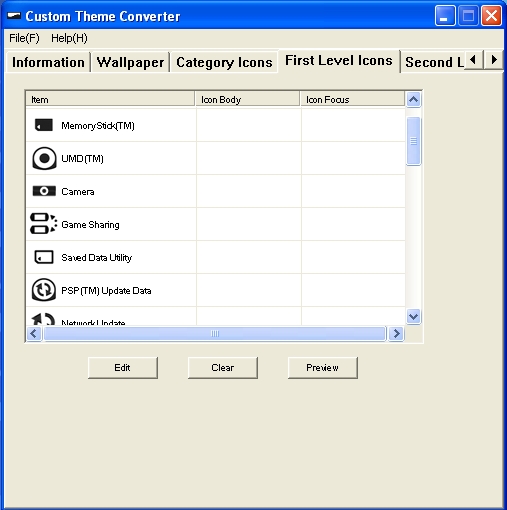
Be sure to read the PDF included in attached download. From what I hear this does work with the new firmwares... I am not sure if this will work on Custom Firmware or just the Normal PSP firmware so please, remember that neither me nor any other PSPBrew member is responsible to what happens to your PSP.
Download
http://www.badongo.com/file/4518968
Posted:
Fri Sep 28, 2007 8:30 amby DarkPacMan77
That is amazing. I'm going to post it up asap.
-DarkPacMan77-
Posted:
Fri Sep 28, 2007 8:37 amby .Yunoko
Yes but I think this will be great because people who make XMB themes will now have an easier time unless, unless there is some sort of patch that makes it not work on CFW.
See this shows that Sony is trying to make the PSP better. But is also ruining its rep for making things like the anti pandora. Anyways what next they are going to make a custom firmware Lol?
I will upload that file to another server in just a min.
Posted:
Fri Sep 28, 2007 8:40 amby DarkPacMan77
Ok, get me the link soon. Sendspace would be nice.
-DarkPacMan77-
Posted:
Fri Sep 28, 2007 8:44 amby .Yunoko
Here you go
http://www.badongo.com/file/4518968 this place never deletes your files unless its porn.
Posted:
Fri Sep 28, 2007 10:53 amby Figz
The PDF is in Japanese. If we could get a translated one that would help alot.
Posted:
Fri Sep 28, 2007 11:09 amby DarkPacMan77
Give it time. Some features are known to be a little goofy so far. The "about" section in the program actually says Sony in it. I know that's easy to fake, but still, it looks like a perfectly honest tool but I think it has a few bugs right now. I'm very hopeful for this one.
-DarkPacMan77-
Posted:
Fri Sep 28, 2007 11:46 amby .Yunoko
Well it came right from the Japanese Sony site so sorry I should have told you. Anyways its still new software so Sony might update it soon but still this is amazing.
Posted:
Fri Sep 28, 2007 11:48 amby Mailas
ANyone know if it works with any (or all) CFWs?
Posted:
Sat Sep 29, 2007 10:43 amby .Yunoko
Agreed...
Anyways I see that almost 200 people have downloaded it anybody have gotten it to work? I don't have my psp right now so I can't test it. Also yes this doesn't seem like the best thing and doing it the normal way is better but at least sony is trying. I still think this is in beta so be patient.
Posted:
Sat Sep 29, 2007 11:07 amby blackzmage
so u can have a old psp with 3.70 and it still will work?
Posted:
Sat Sep 29, 2007 11:42 amby ace
This is one weird program. I dunno know how it even works. I opened it, then tried adding a few pics in but they have to be 64x48 exactly, and in like .png or .tiff format (and another that I can't remember). So then i clicked saved, punched my keyboard to make a random name for it, and it saved it as a text file. Opened the text file and I got this:

I'm guessing you have to have 3.70 or higher to even use the program, if you can figure out how.
well yeah
Posted:
Sat Sep 29, 2007 6:37 pmby tbag
did anyone even read about it? well if not here is a link that should make things a little more clear
click me for info any way i read this when i first saw the app i thought you all did the same my bad
just found this
Posted:
Sun Sep 30, 2007 2:38 pmby tbag
it the english version of the instructions
click me
Posted:
Tue Oct 02, 2007 5:29 pmby staxx
thanks for the links and info...had to change your yellow font to red as it was a little hard to read

Hope to see you stick around.