
Forum    News    Downloads    Saved Games


My sig

<<

psicryptor

User avatar

Brewery Master
Brewery Master

Posts: 1169

Joined: January 02 2006

Location: UMD drive!

Thanks given: 0

Thanks received: 0

Post Thu Mar 02, 2006 2:14 am

My sig

Hows this? I made the Prince of Persia all BAD!!! :twisted:

I know it aint all gr8 but it does look cool... now if someone could add a border to it and put my nick... :)
"A dangerous deed, indeed, to contend with the man who sold the world!"
Image
<<

Samineru

User avatar

Super Brewer
Super Brewer

Posts: 608

Joined: August 28 2005

Location: New Hampshire

Thanks given: 0

Thanks received: 0

Post Thu Mar 02, 2006 4:15 am

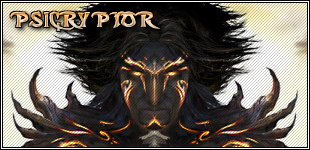
Done:
Image
I can still change the font or something if you want.
EDIT:I also took the liberty of adding scanlines.
Direct link to image: http://i24.photobucket.com/albums/c28/S ... ou9un5.png
Image
Image
<<

psicryptor

User avatar

Brewery Master
Brewery Master

Posts: 1169

Joined: January 02 2006

Location: UMD drive!

Thanks given: 0

Thanks received: 0

Post Thu Mar 02, 2006 6:35 am

its nice but the font doesnt seem to go with the prince of persia image... The color is a little odd too...
And i cant see the scanlines either :( I like the scanlines in port's sig...)

Image

Port made this one for me and i love tht font... could you make something like that? Also with that color?

I know im being a pain but sorry ;)
PS: Port, I really like the sig you made for me but i changed cos the look was kinda getting old... Im still as grateful... :)
"A dangerous deed, indeed, to contend with the man who sold the world!"
Image
<<

Samineru

User avatar

Super Brewer
Super Brewer

Posts: 608

Joined: August 28 2005

Location: New Hampshire

Thanks given: 0

Thanks received: 0

Post Thu Mar 02, 2006 11:34 am

I took a bit of liberty with the text color but here it is:
Image
Image
Image
<<

.Vault

User avatar

Brew Guru
Brew Guru

Posts: 3693

Joined: September 02 2005

Location: NJ

Thanks given: 0

Thanks received: 2 times

Post Thu Mar 02, 2006 12:54 pm

how do u make scaline lines?!
<<

Samineru

User avatar

Super Brewer
Super Brewer

Posts: 608

Joined: August 28 2005

Location: New Hampshire

Thanks given: 0

Thanks received: 0

Post Thu Mar 02, 2006 1:10 pm

You mean scanlines?
1.Make a 3x3 image
2.With the pencil tool draw in 2 opposite corners and the center pixel.
3. Define as pattern
4. Make a new layer and fill it with that pattern
5. Lower the opacity of that layer
This is for photoshop just because I'm geussing you use that. It might be abit off because I don't use photoshop but whatever,
Image
Image
<<

.Vault

User avatar

Brew Guru
Brew Guru

Posts: 3693

Joined: September 02 2005

Location: NJ

Thanks given: 0

Thanks received: 2 times

Post Thu Mar 02, 2006 1:33 pm

i made it an made it a patern... now what?
<<

shadox

User avatar

Brew Guru
Brew Guru

Posts: 3204

Joined: November 14 2005

Thanks given: 0

Thanks received: 0

Post Thu Mar 02, 2006 1:35 pm

In the tool box, hit the paint bucket, and then at the top left change foreground to pattern, and select your patter, and then lay it on your picture.
<<

.Vault

User avatar

Brew Guru
Brew Guru

Posts: 3693

Joined: September 02 2005

Location: NJ

Thanks given: 0

Thanks received: 2 times

Post Thu Mar 02, 2006 2:27 pm

i did that but it looks all screwed up on my picture is my pattern right?
[ ] = pixel
[|] = shaded pixle


[|][ ][ ]
[ ][|][ ]
[ ][ ][|]
<<

shadox

User avatar

Brew Guru
Brew Guru

Posts: 3204

Joined: November 14 2005

Thanks given: 0

Thanks received: 0

Post Thu Mar 02, 2006 2:30 pm

I did a 5x5 and it worked, but make the image at a 1600% magnification and try it out..

Great sig you guys have made here!
<<

Samineru

User avatar

Super Brewer
Super Brewer

Posts: 608

Joined: August 28 2005

Location: New Hampshire

Thanks given: 0

Thanks received: 0

Post Thu Mar 02, 2006 2:31 pm

It is on a different layer right? And you lowered the opacity of that layer?
Image
Image
<<

.Vault

User avatar

Brew Guru
Brew Guru

Posts: 3693

Joined: September 02 2005

Location: NJ

Thanks given: 0

Thanks received: 2 times

Post Thu Mar 02, 2006 2:44 pm

i made an all white layer but the lines are distorted...

it always looks like this
Image
n e 1 want to help
PLEASE
<<

Samineru

User avatar

Super Brewer
Super Brewer

Posts: 608

Joined: August 28 2005

Location: New Hampshire

Thanks given: 0

Thanks received: 0

Post Thu Mar 02, 2006 3:35 pm

It looks like you put one pixel in each corner and not just in a diagonal line down the center, are you sure your grid looks like this?
[\][ ][ ]
[ ][\][ ]
[ ][ ][\]
Image
Image
<<

manh

User avatar

Experienced Brewer
Experienced Brewer

Posts: 259

Joined: February 01 2006

Thanks given: 0

Thanks received: 0

Post Thu Mar 02, 2006 6:37 pm

i think u should use port's sig he made for you...nothing else u had beats that, so what if its old, its unique and awsome. ...just like mine :D
Image
Image
<<

.Vault

User avatar

Brew Guru
Brew Guru

Posts: 3693

Joined: September 02 2005

Location: NJ

Thanks given: 0

Thanks received: 2 times

Post Thu Mar 02, 2006 6:42 pm

thanks all i got it working.

manh is that you???
Next

Return to Graphics Section

Who is online

Users browsing this forum: No registered users and 18 guests

Powered by phpBB © 2000, 2002, 2005, 2007 phpBB Group.
Designed by ST Software for blacklist.org.