Tue Apr 10, 2007 4:02 am
Tons of RARE appZ n' EazY/SAFE Downgraders
AFKIM

This is a homebrew application that will alow you to go on MSN,AIM,YAHOO, etc.
This is done through wifi and messenger clients and is for 3.XX OE-X
ENJOY!
----------------------------------------------------------------------------------------------------------------------------------------------
PSP 2.80 TA-082 to TA-086 Downgrader [ALL MOTHERBOARDS]
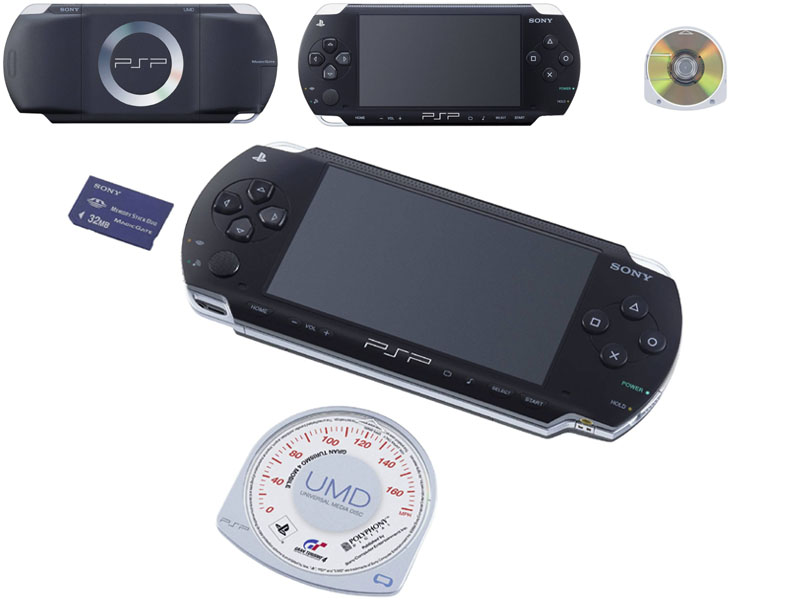
PLEASE FOLLOW INSTURUCTIONS!
- Copy the contents of MS_ROOT into the root folder of your memory stick.
- Run 2.80 HEN if you are not already running it.
- If running a ta-082 PSP execute the 2.80 idstorage changer. It needs 75% battery.
It will change some keys of your idstorage needed to downgrade the ta-082.
- The program will exit to the XMB. Now execute the generic downgrade, which will show in the xmb
as "Update X.YX" in the psp language.
- The generic downgrader will also need 75% battery. IT will downgrade your psp to 1.50.
- At the end, it will ask you to press X to restart the psp. Do it.
- If all went fine, you'll receive a blue screen telling you to press O. Do it, and reenter your settings.
Welcome to 1.50.
- If things didn't go that fine, you'll have a non-functional psp, aka brick.
You accepted that risk, remember.
THIS IS AS SAFE AS IT CAN POSSIBILY GET. MANY SAFETY CHECKS IS ADDED TO ENSURE A SECURE AND SAFE DOWNGRADE
----------------------------------------------------------------------------------------------------------------------------------------------------------------
Windows 95 on PSP
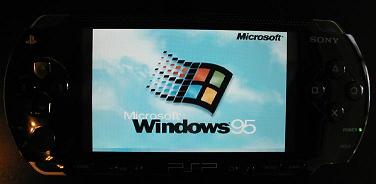
[font=Arial]To save you the hastle, I have got a file with everythin archived onto winRAR ready for you guys to check out. All you have to do is download and Extract.
I did'nt bother putting a password on, to save you guys more time[/font]
Instructions/Info on how to install:
1/ open the map 'PSP1WIN95'
2/ copy the map game to the map 'PSP'
3/ copy the map VM to the root of your PSP
4/ open c.img.rar (pass: elitescar)
5/ copy c.img to the VM map
6/ start win95 on your PSP!!
Keys
Directional keys - Mouse movement (press repeatedly)
SQUARE - Left mouse button
CIRCLE - Right mouse button
CROSS - Middle mouse button
START - Opens the windows start menu
SELECT - Quits immediatly (though you should shutdown windows instead)
-----------------------------------------------------------------------------------------------------------------------------------------------------
Custom Firmware 3.03 OE-C

---------------------------------------------------------------
For 1.50 users:
Go to your PSP'S GAME tab Memory Stick.
Run the 3.03 OE-C Firmware Install.
---------------------------------------------------------------
Previous Custom Firmware users:
YOu MUST set you kernel to 1.50 in recovery mode.
HOLD your PSP's power button to turn it off, then HOLD the R key to turn it back on.
Under the configuration option:
Game folder hombrew (currently: X kernel) <- Set this to 1.50 kernel!
Exit recovery mode:
Go to your PSP'S GAME tab Memory Stick.
Run the 3.03 OE-C Firmware Install.
--------------------------------------------------------------------------------------------------------------------------------------------
Self Extractor/ Easy Installer

All needed files to safely downgrade a 3.03 PSP. This edition has many safety checks to ensure a safe downgrade as long as the detailed instructions are followed.
Easy Instructions:
****YOU MUST HAVE A ~UNPATCHED~ GTA VCS TO USE THIS!****
****MEANING IT HAS THE 2.0 UPDATE ON THE UMD AND NOT 2.60****
1. Load GTA LCS
2. It should get to loading savegame, then the screen will clear to black and fill with a light blue colour, then the PSP will reset itself (if this does not happen see section below)
3. Check that HEN is running by going to system settings, then to "System Information" and it should show up as system version 303 HEN
4. If it is showing up as HEN then go to the memory stick and run the x.yz update
5. If you have an unpatched TA-082 or higher motherboard, you will be prompted to allow the downgrader to patch your motherboard so it can be safely downgraded. The downgrader will not let you proceed without patching, if your motherboard requires it.
6. Before the downgrader does anything to your PSP it will ask for you to agree to what it is doing, if you no longer want to continue press the Right Shoulder Button (R-TRIGGER).
7. Once you have agreed to start the downgrade do not unplug the PSP, or try and restart it
8. Once finished the PSP will ask you to press X, and reset itself
9. If it comes up saying that the settings are corrupt, press x to continue, this will mean you will need to re-enter the settings for network connections into your PSP, otherwise go to step 11.
10 Load the included NetConfigBackup application in your PSP, and select to restore, this will take the backup that was done of the network config that was done automatically during the downgrade.
11 - All done now Hopefully you now have a 1.50 PSP. Enjoy it responsibly.
-----------------------------------------------------------------------------------------------------------------------------------------------------------------------------------
ENJOY!
This is a homebrew application that will alow you to go on MSN,AIM,YAHOO, etc.
This is done through wifi and messenger clients and is for 3.XX OE-X
ENJOY!
----------------------------------------------------------------------------------------------------------------------------------------------
PSP 2.80 TA-082 to TA-086 Downgrader [ALL MOTHERBOARDS]
PLEASE FOLLOW INSTURUCTIONS!
- Copy the contents of MS_ROOT into the root folder of your memory stick.
- Run 2.80 HEN if you are not already running it.
- If running a ta-082 PSP execute the 2.80 idstorage changer. It needs 75% battery.
It will change some keys of your idstorage needed to downgrade the ta-082.
- The program will exit to the XMB. Now execute the generic downgrade, which will show in the xmb
as "Update X.YX" in the psp language.
- The generic downgrader will also need 75% battery. IT will downgrade your psp to 1.50.
- At the end, it will ask you to press X to restart the psp. Do it.
- If all went fine, you'll receive a blue screen telling you to press O. Do it, and reenter your settings.
Welcome to 1.50.
- If things didn't go that fine, you'll have a non-functional psp, aka brick.
You accepted that risk, remember.
THIS IS AS SAFE AS IT CAN POSSIBILY GET. MANY SAFETY CHECKS IS ADDED TO ENSURE A SECURE AND SAFE DOWNGRADE
----------------------------------------------------------------------------------------------------------------------------------------------------------------
Windows 95 on PSP
[font=Arial]To save you the hastle, I have got a file with everythin archived onto winRAR ready for you guys to check out. All you have to do is download and Extract.
I did'nt bother putting a password on, to save you guys more time[/font]
Instructions/Info on how to install:
1/ open the map 'PSP1WIN95'
2/ copy the map game to the map 'PSP'
3/ copy the map VM to the root of your PSP
4/ open c.img.rar (pass: elitescar)
5/ copy c.img to the VM map
6/ start win95 on your PSP!!
Keys
Directional keys - Mouse movement (press repeatedly)
SQUARE - Left mouse button
CIRCLE - Right mouse button
CROSS - Middle mouse button
START - Opens the windows start menu
SELECT - Quits immediatly (though you should shutdown windows instead)
-----------------------------------------------------------------------------------------------------------------------------------------------------
Custom Firmware 3.03 OE-C
---------------------------------------------------------------
For 1.50 users:
Go to your PSP'S GAME tab Memory Stick.
Run the 3.03 OE-C Firmware Install.
---------------------------------------------------------------
Previous Custom Firmware users:
YOu MUST set you kernel to 1.50 in recovery mode.
HOLD your PSP's power button to turn it off, then HOLD the R key to turn it back on.
Under the configuration option:
Game folder hombrew (currently: X kernel) <- Set this to 1.50 kernel!
Exit recovery mode:
Go to your PSP'S GAME tab Memory Stick.
Run the 3.03 OE-C Firmware Install.
--------------------------------------------------------------------------------------------------------------------------------------------
Self Extractor/ Easy Installer
All needed files to safely downgrade a 3.03 PSP. This edition has many safety checks to ensure a safe downgrade as long as the detailed instructions are followed.
Easy Instructions:
****YOU MUST HAVE A ~UNPATCHED~ GTA VCS TO USE THIS!****
****MEANING IT HAS THE 2.0 UPDATE ON THE UMD AND NOT 2.60****
1. Load GTA LCS
2. It should get to loading savegame, then the screen will clear to black and fill with a light blue colour, then the PSP will reset itself (if this does not happen see section below)
3. Check that HEN is running by going to system settings, then to "System Information" and it should show up as system version 303 HEN
4. If it is showing up as HEN then go to the memory stick and run the x.yz update
5. If you have an unpatched TA-082 or higher motherboard, you will be prompted to allow the downgrader to patch your motherboard so it can be safely downgraded. The downgrader will not let you proceed without patching, if your motherboard requires it.
6. Before the downgrader does anything to your PSP it will ask for you to agree to what it is doing, if you no longer want to continue press the Right Shoulder Button (R-TRIGGER).
7. Once you have agreed to start the downgrade do not unplug the PSP, or try and restart it
8. Once finished the PSP will ask you to press X, and reset itself
9. If it comes up saying that the settings are corrupt, press x to continue, this will mean you will need to re-enter the settings for network connections into your PSP, otherwise go to step 11.
10 Load the included NetConfigBackup application in your PSP, and select to restore, this will take the backup that was done of the network config that was done automatically during the downgrade.
11 - All done now
Hopefully you now have a 1.50 PSP. Enjoy it responsibly.-----------------------------------------------------------------------------------------------------------------------------------------------------------------------------------
ENJOY!